Creating an Athlete Account
ВидеоинструкцияAthlete Registration
How do you create an athlete account on StrikerStat? Registration takes just a few minutes and requires only a phone number or an email address — here's the whole process, step by step.
Step 1. Go to Registration
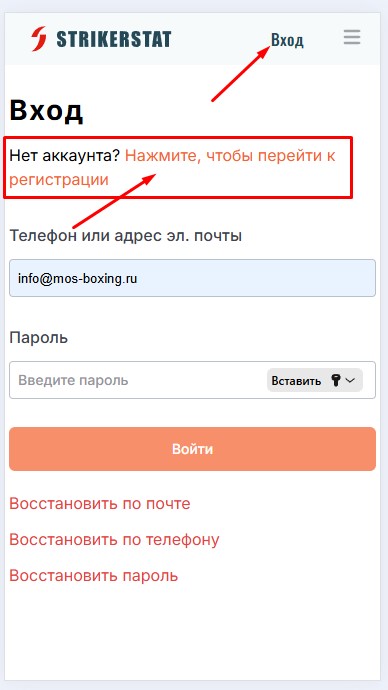
Open the StrikerStat home page at strikerstat.com and click the "Log in" button in the top right corner of the screen.
Since you don't have a platform account yet, click the "Click here to register" link under the "Log in" heading on the login page that opens, as shown in the screenshot.
Step 2. Fill Out the Registration Form
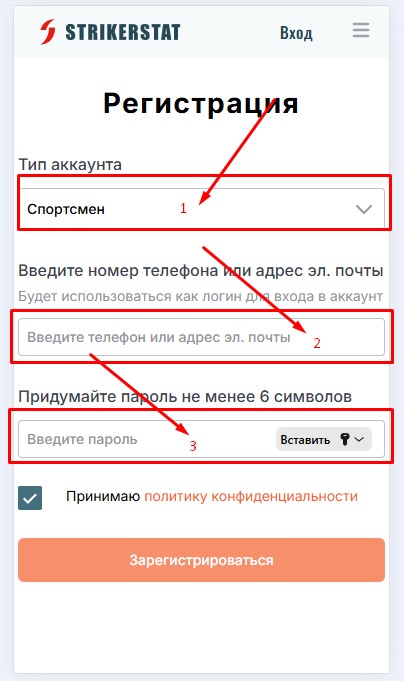
On the registration page, select the account type — in this case, "Athlete" (the options "Coach," "Referee," and "Organizer" are also available).
Then enter a mobile phone number or an email address — this contact will become your login for signing in and will be needed to recover access — and choose a password of at least 6 characters.
All that's left is to accept the privacy policy and click "Register."
Step 3. Confirm Registration
The last step is to confirm your registration — via the link sent to the email you provided, or via the SMS code sent to your phone. Once confirmed, you'll land on your personal page on the platform: your athlete account is ready to use.