Overview of the "Draw" Section
To access the section, the organizer needs to log in to their account, select the relevant competition, and click the "Draw" button.
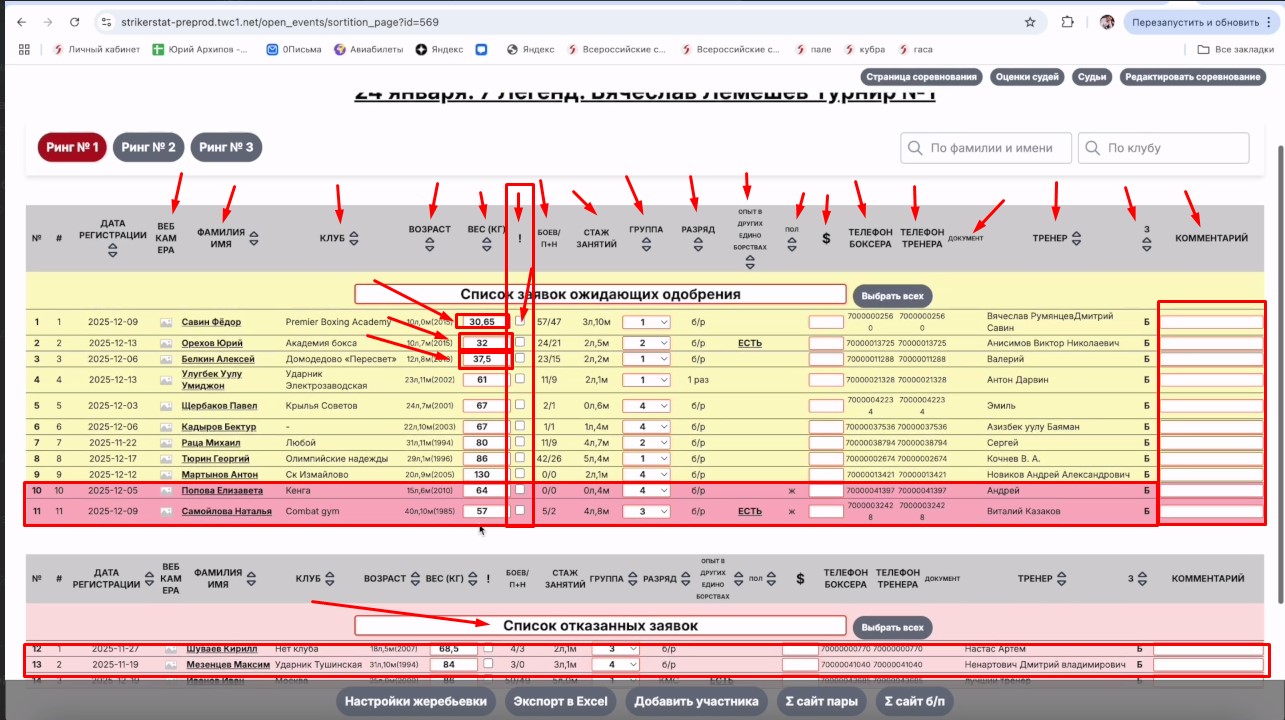
The section contains three color-coded lists: yellow — boxers awaiting confirmation of participation. Red is the same as yellow, but for female athletes. Pink — boxers whose applications were rejected for one reason or another.
To move a participant to the "Rejected Applications List," select the row with their data (by clicking anywhere without active links) — a "Reject Participants" button will appear at the bottom. You can select several participants at once for simultaneous transfer.
What the table shows
Columns of the table on the "Draw" page:
- Participants can be sorted in ascending order (A to Z, or 1 to infinity) or descending order.
- "Webcam" — a separate button in each row for uploading a video interview with the boxer; the material goes straight to their page and is stored on the StrikerStat platform.
- Age is shown in maximum detail — accounting for both years and months.
- Weight can be adjusted right on the "Draw" page without going to the boxer's page — this is convenient for entering the current weight. Next to it is a "!" column for marking that a weigh-in has taken place, if weight is verified on the day of the tournament.
- The "Group" column relates to the automatic draw functionality.
- The second-to-last column shows who submitted the application: "B" — boxer, "C" — coach, "O" — organizer.
- The "Comments" column lets you add extra information — for example, the order of appearance or preferences for the draw.
- To view detailed information about a participant, click their full name in the "Last Name First Name" column — this is an active link.
Important: by default, sorting is by age (up to 19 years old), then by weight, with male accounts listed before female accounts.